
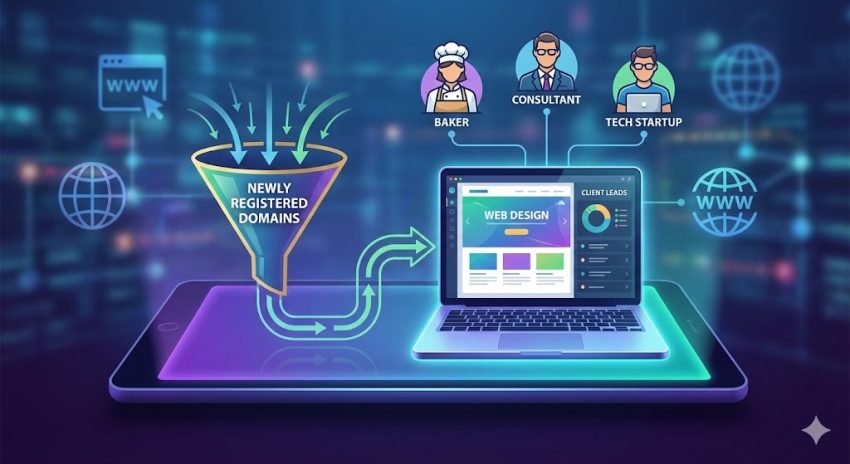
For every web design agency and freelancer, the biggest challenge isn’t doing the work—it’s finding the work. You might be the best designer in the world, but if your pipeline is empty, your business stagnates. Most designers rely on saturated marketplaces like Upwork or wait passively for referrals. But what if you could contact a potential client the exact moment they decided they needed a website?
This is where Newly Registered Domains (NRDs) come in.
Every single day, over +150,000 new domain names are registered globally. Behind a significant portion of these domains are small business owners, startups, and entrepreneurs who have just taken the first step in building their online presence. They have bought the name, but they haven’t built the site yet.
This guide will teach you exactly how to tap into this “hidden” stream of high-intent leads to generate unlimited web design projects without spending a fortune on ads.
What Are Newly Registered Domains?
A Newly Registered Domain list is exactly what it sounds like: a daily record of every single .com, .net, .org, and other domain extensions purchased in the last 24 hours.
When someone buys a domain like BestPizzaInChicago.com, that information enters a central database. By accessing this data, you can see:
- The Domain Name: (e.g.,
ChicagoPlumbingPros.com) - Registration Date: (e.g., Yesterday)
- Contact Information: (Name, Email, Phone Number—if publicly available)
For a web designer, this is not just data; it is a list of people who have raised their hands and said, “I am starting a business, and I need a website.”
Why This Strategy Beats Traditional Lead Gen
Why should you focus on new domains instead of scraping LinkedIn or Google Maps? The answer lies in timing and intent.
1. Perfect Timing
When you find a business on Google Maps, they likely already have a website. If they don’t, they might not want one. But someone who just paid $15 for a domain name yesterday is in “buying mode.” They are actively thinking about their website right now. If your email lands in their inbox today, you aren’t an annoyance; you are a timely solution.
2. Low Competition
If a business posts a job on a freelance platform, you are competing with 50 other designers. But with domain leads, you are often the first person to contact them. You are proactively offering value before they even have a chance to look for a vendor.
3. High Volume
With 100,000+ domains registered daily, the supply of leads is effectively unlimited. Even if you filter out 90% of them as “junk,” you are still left with thousands of potential prospects every single week.
Step 1: How to Get the Data (Free vs. Paid)
To execute this strategy, you first need access to the data. There are three main ways to get lists of newly registered domains, depending on your budget and technical skill.
The “DIY” Method (Free)
If you are comfortable with coding (specifically Python), you can build your own lead feed for free.
- CertStream: This is a free, real-time stream of certificate transparency logs. Whenever a new SSL certificate is issued (which happens for most new domains), it appears here. You can write a script to listen to this stream and save the domain names.
- GitHub Repositories: Security researchers often upload daily lists of new domains to GitHub. A quick search for “newly registered domains raw list” will yield text files you can download.
Note: These free methods usually only give you the domain name. You will still need to perform a “Whois Lookup” to find the owner’s email address, which can be time-consuming.
The “Budget” Method (Best for Freelancers)
If you have a small budget ($10–$20/month), you can buy raw lists from providers like GetWhoisDB, Domains-Monitor, or resellers on marketplaces.
- Pros: Very affordable; saves you the hassle of coding.
- Cons: The data is often “raw,” meaning it contains a lot of spam domains and privacy-protected emails that you must filter yourself.
The “Premium” Method (Best for Agencies)
Companies like WhoisXML API or WhoisFreaks offer “cleaned” databases where they use algorithms to remove junk domains and only show you records with valid contact info. This costs significantly more ($50–$200/month) but saves hours of manual work.
Step 2: Filtering Your Leads (Crucial Step)
The biggest mistake beginners make is downloading a list of 100,000 domains and emailing everyone. Do not do this. You will get flagged as spam immediately. You must filter the list to find the “Goldilocks” clients.
1. Filter by TLD (Top-Level Domain)
Stick to reputable extensions.
- Keep:
.com,.net,.org,.co.uk,.in(or your local country code). - Discard:
.xyz,.top,.club,.info. These cheap extensions are often used by spammers or bot networks, not serious business owners.
2. Keyword Filtering
You want to find businesses, not personal projects. Filter the domain names for commercial keywords.
- Positive Keywords: Plumbing, Law, Dental, Shop, Store, Consulting, Agency, Group, Solutions, Tech, Crypto, Home, Care, Transport.
- Negative Keywords: Test, Hack, Free, Cheap, Porn, Gamble, Casino.
3. The “Privacy” Check
About 70-80% of domains use “Whois Privacy Protection,” meaning the owner’s email is hidden (e.g., contact@privacyprotect.org).
- Strategy A: Filter these out and only focus on the 20% who publicly share their real email (Gmail, Yahoo, Outlook, or business mail).
- Strategy B: If you see a great domain like
AtlantaRoofingPros.combut the email is hidden, visit the URL. sometimes they put up a “Coming Soon” page with a contact form or phone number.
Step 3: The Cold Outreach Strategy
Now that you have a list of 50-100 high-quality potential businesses, it’s time to reach out. The goal is not to “sell” immediately but to start a conversation.
The “Helpful Expert” Approach
Don’t send a generic “I can build your website for $500” email. Instead, position yourself as a helpful expert who noticed their new venture.
Subject Line Ideas:
- Question about [DomainName.com]
- Saw you just registered [DomainName.com]
- Quick tip for your new site
The “Pattern Interrupt” Body
Most people expect spam. Surprise them by being personal and specific. Mention the domain name explicitly so they know it’s not a bulk blast.
Cold Email Template #1: The Soft Pitch
Subject: Quick question about [DomainName.com]
Hi [Name or “there”],
I saw that you recently registered [DomainName.com]—congrats on starting the new project! It’s a great name.
I’m a web developer who specializes in helping new businesses get off the ground. I was checking to see if you’ve already started building the site?
If you’re still looking for options, I’d love to send over a few examples of similar sites I’ve built for businesses in your industry.
Either way, best of luck with the launch!
Best, [Your Name] [Link to your Portfolio]
Cold Email Template #2: The Value-First Pitch
Subject: Ideas for [DomainName.com]
Hi [Name],
I came across [DomainName.com] in the new registry logs this morning.
I work with businesses in the [Industry if known, e.g., construction] space, and I actually had a few ideas on how you could structure the homepage to get more leads right from day one.
Are you open to a 5-minute chat? I can share some quick mockups I made—no obligation at all.
Cheers, [Your Name]
Step 4: Automating the Process
Doing this manually every day is exhausting. To scale this into an “unlimited” lead machine, you need automation.
- Data Auto-Fetch: Use a script or Zapier to automatically pull the new domain list from your provider every morning at 9:00 AM.
- Email Verification: Run the extracted emails through a tool like NeverBounce or ZeroBounce. This is critical. Sending emails to dead addresses will destroy your sender reputation.
- Drip Campaigns: Use cold email software (like Instantly.ai, Lemlist, or Woodpecker) to send your emails. Set up a follow-up sequence.
- Email 1: The initial pitch (Day 1).
- Email 2: A “bump” email providing a free resource or checklist (Day 4).
- Email 3: The breakup email (“I won’t bother you again”) (Day 8).
Important: Compliance and Ethics (GDPR & CAN-SPAM)
When using Whois data, you must be aware of the laws.
- GDPR (Europe): It is generally illegal to cold email European citizens using personal data scraped from Whois without consent. It is safer to filter out
.eu,.uk,.de, and other European TLDs if you want to be 100% safe. - CAN-SPAM (USA): You can legally cold email US businesses, provided you:
- Don’t use misleading subject lines.
- Include your physical address in the footer.
- Include a clear “Unsubscribe” link.
Best Practice: Always target businesses, not individuals. If the registrant name is “John Doe” and the email is john.doe@gmail.com, proceed with caution. If the email is admin@construction-company.com, you are in the clear for B2B outreach.
Conclusion
Generating web design leads using newly registered domains is one of the most cost-effective strategies available today. It bridges the gap between you (the service provider) and them (the business owner) exactly when they need you most.
By systematically downloading these lists, filtering for quality, and sending personalized, helpful outreach, you can fill your sales pipeline with high-paying clients, and stop relying on luck to grow your agency.
Ready to start? Download a sample list today, filter for your favorite niche, and send your first 10 emails. The results might surprise you.